The information architecture toolbox for better product and service design
Updated August 8, 2026. Published April 1, 2026 • 6 minute read

By Austin Govella, digital strategist (and former information architect)
Since 1998, Austin has applied his information architecture skills for organizations big and small all across the globe. He co-authored Information Architecture: Blueprints for the web, 2nd edition with Christina Wodtke.
Key takeaway: You're already doing information architecture. There are four questions you ask every time you sit down to design something, and the I.A. tools you use change depending on the scale of what you're designing, from interfaces to sites and platforms.
Information architecture is a fuzzy term. It’s used to describe everything from content organization to navigation, taxonomies, and sitemaps. But you actually use information architecture all the time while designing, and there are set of I.A. tools you can keep in your toolbox that will help you design better products and services.
It's useful to define information architecture, so you know when to reach for your I.A. toolbox.
“information architecture”, the activity, is all about making things make sense
“Information Architecture”, capitalized, refers to a field, a design discipline whose practitioners use the title, “Information Architect”. Information Architect, as a title, isn’t as common as it once was, and we don’t talk about the field of Information Architecture as much as we used to.
When we talk about “information architecture”, all lowercase, we talk about an activity. The activity of information architecture is about making sense of things, so they can make sense for other people. In Jorge Arango’s language, information architecture makes things “legible” for people and systems. That’s why information architecture is so useful for designers of all kinds as you design products and systems that will be used by other people.
And you can make sense of anything. Everything around us has an information architecture.
Even Information Architecture has an information architecture. Abby Covert used her I.A. skills to define an information architecture for Information Architecture and published it as the I.A. book, How to Make Sense of Any Mess.
So information architecture is needed lots of places, and it's done lots of places. Even if you don't realize it, you're doing information architecture all the time.
What do we do when we do information architecture?
When you figure out the information architecture of some thing, you answer four questions:
What stuff do we have?
How can we organize this stuff?
What can we call this stuff?
How is this stuff related?
We naturally ask these questions when we design things, even ones that have nothing to do with content organization, navigation, or taxonomies.
Forms are information architecture problems
Every form asks a designer to sequence questions, group related fields, label inputs, and create relationships between data points. A checkout form that asks for a shipping address before a billing address makes a structural choice. That choice helps or confuses the person who fills out the form.
Visual design skills can make your form easier to consume. Interaction design makes each form element easier to use. But it’s information architecture that makes the form, as a whole, easier to understand. Information architecture makes the form make sense.
Next time you design a form, walk through the four questions before you lay out your form and see if you can make the form make more sense.
Design systems are information architecture problems
A design system is an information architecture project. Component names follow labeling principles. Component grouping follows categorization principles. The way a team organizes buttons, inputs, cards, and modals determines whether a designer can find and use the right component. A design system with poor information architecture slows every designer who touches the system. Information architecture turns a collection of styles, variables, and components into a design system that's easy to use. Information architecture makes your design system make sense.
If you have a design system that’s a little hard to use, try working through the four questions and see if you can adjust how it’s organized, so it makes more sense and is easier to use.
Error states and empty states are information architecture problems
When something goes wrong or nothing exists yet, a designer must make sense of absence or failure for another person. An empty dashboard needs structure that communicates “here’s what belongs here and how to get started”. An error message needs structure that communicates “here’s what happened, here’s why, here’s what to do next”. That’s a core IA activity: making sense of things for other people.
Although each of these examples looks different, in each, you combine other design skills with information architecture to design something that makes sense. But as you can see, information architecture looks a little different depending on what you're designing.
So, what kinds of things do we design?
Information architecture can help you design interfaces, sites, and platforms
Information architecture can help you design something like an individual interface. Think of a single form.
Information architecture can help you design a collection of lots of interfaces. Think of a mobile app or a website.
Information architecture can even help you design platforms where lots of sites live. Think of a company's intranet or a social network.
Information architecture looks different when applied to an interface than when its applied to a site or platform. That's because interfaces, sites, and platforms work at different scales. So, IA stays the same, but it looks different when you apply it at a different scale.
If you think about this, it makes sense. The information architecture problem with a form in your app is different than the information architecture problem you have with the ontology for your intranet.
We still ask the same four I.A. questions about stuff:
What stuff do we have? This is our content and functionality.
How can we organize this stuff? This is our structure.
What can we call this stuff? These are our labels.
How is this stuff related? These are the relationships between everything.
But based on the scale we’re working at, we have different stuff we’re dealing with. And that gives us different tools.
Information architecture tools are different at different scales
Lots of information architecture tools live in our design toolbox, and the tools are a little different at each scale.
I.A. tools for working on interfaces
Here are I.A. tools for when you’re working on interfaces:
Content maps
Task flows
Labels
Content model
Wireframes
Content maps and content models are tools for working with our content. Task flows and wireframes are tools for working with our structure. And labels are just our labels.
I.A. tools for working on sites
Here are I.A. tools for when you’re working on a site:
Content inventories and audits
Sitemaps
Taxonomies
Navigation models
Content inventories and audits are tools for working with our content. Sitemaps are for working with our structure. Taxonomies are tools for working with labels, and navigation models deal with the relationships between things.
I.A. tools for working on platforms
And here are I.A. tools for when you’re working on a platform:
Entity models
Ontologies
Metadata models
Entity models are ways of modeling our content. Ontologies and metadata models are ways of working with our labels.
Each of these tools comes in handy for a different part of the experience that you want to design. Understanding what part of the experience you're designing lets you know what tool to pull out of the toolbox. And each of these information architecture tools helps something make sense, so it makes sense someone else.
This diagram shows how the tools map to both our four questions and our different scales.
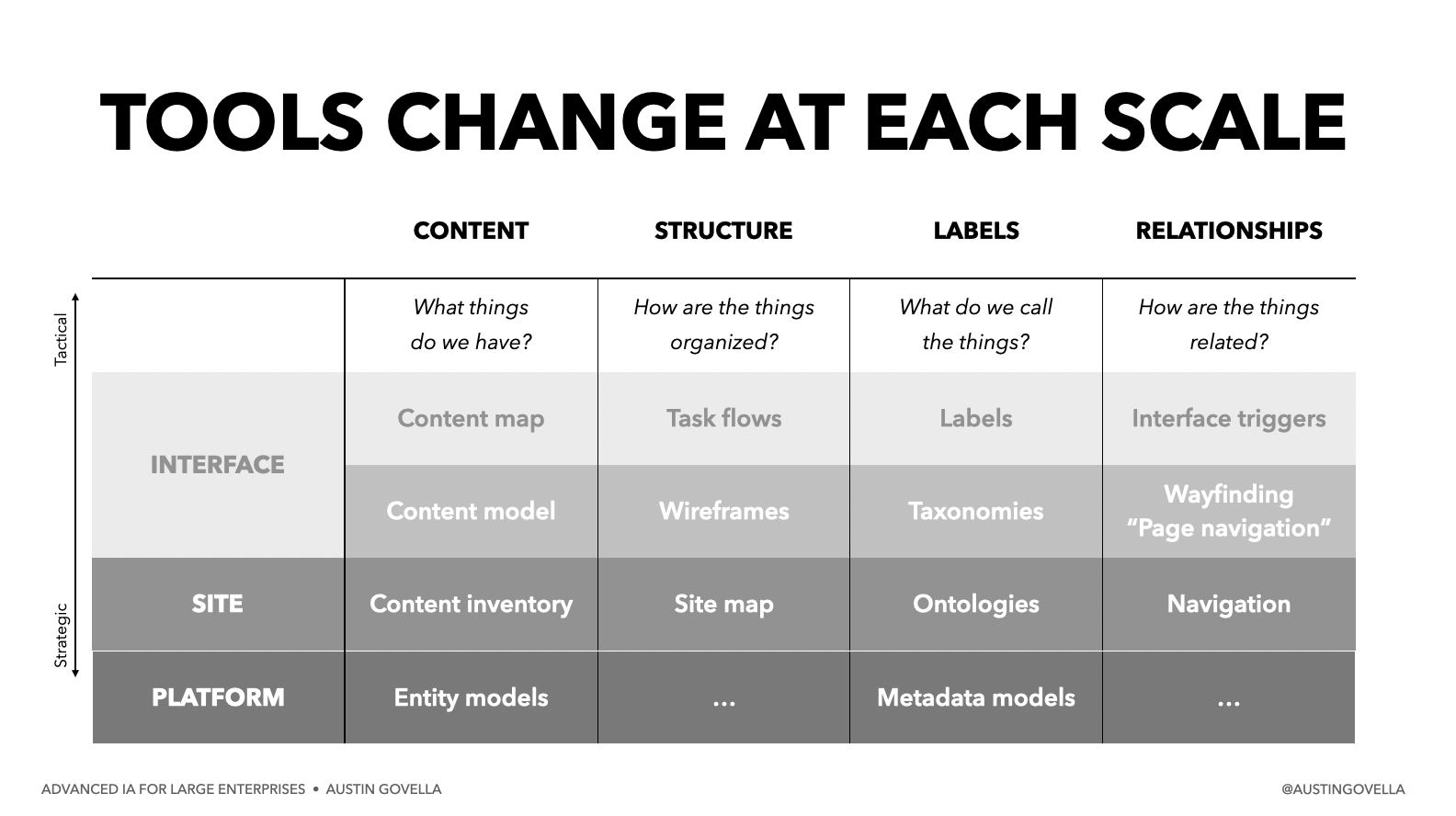
That’s a lot of tools, and there are even more, but we can’t go into all of them in this post, so we’ll devote an article to each one as we go along.
But first, before we get to tools, we need to remember that information architecture is about making things make sense, so they make sense to other people.